Kubernetes部署内网穿透服务nps
运行环境
| 组件 |
版本 |
备注 |
| kubernetes |
1.20.11 |
阿里云ACK |
| nps/npc |
v0.26.10 |
官方二进制文件 |
nps服务镜像
下载nps和npc二进制文件
1
2
3
4
|
# nps
https://github.com/ehang-io/nps/releases/download/v0.26.10/linux_amd64_server.tar.gz
# npc
https://github.com/ehang-io/nps/releases/download/v0.26.10/linux_amd64_client.tar.gz
|
工作目录如下
 1
 2
 3
 4
 5
 6
 7
 8
 9
10
11
12
13
|
├── build # 编译
│   ├── client # client端
│   │   ├── conf # 配置文件
│   │   ├── Dockerfile # 容器镜像打包文件
│   │   └── npc # 客户端二进制文件
│   └── server # server端
│       ├── conf # 配置文件
│       ├── Dockerfile # 容器镜像打包文件
│       ├── nps # 服务端二进制文件
│       └── web # 服务端前端代码文件
└── deploy # 部署
    ├── client.yaml # 客户端部署文件
    └── server.yaml # 服务端部署文件
|
-
nps
编写Dockerfile
1
2
3
4
5
6
7
|
FROM alpine:latest # 初始镜像

WORKDIR /workspace # 工作目录

ADD . . # 复制文件

ENTRYPOINT ["./nps"] # 启动命令
|
运行docker build
1
2
|
docker build -t registry.cn-hangzhou.aliyuncs.com/zhangjinhui/nps:latest .
docker push registry.cn-hangzhou.aliyuncs.com/zhangjinhui/nps:latest
|
-
npc
编写Dockerfile
1
2
3
4
5
6
7
|
FROM alpine:latest # 初始镜像

WORKDIR /workspace # 工作目录

ADD npc npc # 复制文件

ENTRYPOINT ["./npc"] # 启动命令
|
运行docker build
1
2
|
docker build -t registry.cn-hangzhou.aliyuncs.com/zhangjinhui/npc:latest .
docker push registry.cn-hangzhou.aliyuncs.com/zhangjinhui/npc:latest
|
部署文件
server
 1
 2
 3
 4
 5
 6
 7
 8
 9
10
11
12
13
14
15
16
17
18
19
20
21
22
23
24
25
26
27
28
29
30
31
32
33
34
35
36
37
38
39
40
41
42
43
44
45
46
47
48
49
50
51
52
53
54
55
56
57
58
59
60
61
62
63
64
65
66
67
68
69
70
71
72
73
74
75
76
77
78
79
80
81
82
83
84
85
86
87
88
89
90
91
92
93
94
95
|
apiVersion: apps/v1
kind: Deployment
metadata:
  name: nps
  namespace: nps
spec:
  replicas: 1
  selector:
    matchLabels:
      app: nps
  template:
    metadata:
      labels:
        app: nps
    spec:
      imagePullSecrets:
      - name: standard
      containers:
      - image: registry.cn-hangzhou.aliyuncs.com/zhangjinhui/nps:latest
        imagePullPolicy: Always
        name: nps
        ports:
        - containerPort: 8080 # web管理页面
          name: http
          protocol: TCP
        - containerPort: 8024 # client/server连接端口
          name: client
          protocol: TCP
        - containerPort: 8025 # 代理端口
          name: hl
          protocol: TCP
---
# 这个service用来内部访问,ingress的后端,和client连接server使用
apiVersion: v1
kind: Service
metadata:
  name: nps
  namespace: nps
spec:
  ports:
  - name: http
    port: 8080
    protocol: TCP
    targetPort: http
  - name: client
    port: 8024
    protocol: TCP
    targetPort: client
  selector:
    app: nps
  sessionAffinity: None
  type: ClusterIP
---
# 这个service用来代理,ACK节点没有公网IP,所以需要SLB来代理这个端口供外部访问
apiVersion: v1
kind: Service
metadata:
  name: nps-external
  namespace: nps
spec:
  ports:
  - name: hl
    port: 8025
    protocol: TCP
    targetPort: hl
    nodePort: 31888
  selector:
    app: nps
  sessionAffinity: None
  type: NodePort
---
# ingress透出web管理页面
apiVersion: networking.k8s.io/v1
kind: Ingress
metadata:
  annotations:
    nginx.ingress.kubernetes.io/ssl-redirect: "false"
  name: nps
  namespace: nps
spec:
  rules:
  - host: nps.example.com
    http:
      paths:
      - backend:
          service:
            name: nps
            port:
              number: 8080
        path: /
        pathType: ImplementationSpecific
  tls:
  - hosts:
    - '*.example.com'
    secretName: example
|
client
 1
 2
 3
 4
 5
 6
 7
 8
 9
10
11
12
13
14
15
16
17
18
19
20
21
22
23
|
apiVersion: apps/v1
kind: Deployment
metadata:
  name: npc
  namespace: nps
spec:
  replicas: 1
  selector:
    matchLabels:
      app: npc
  template:
    metadata:
      labels:
        app: npc
    spec:
      imagePullSecrets:
      - name: standard
      containers:
      - image: registry.cn-hangzhou.aliyuncs.com/zhangjinhui/npc:latest
        imagePullPolicy: Always
        name: npc
        # command 配置需要和server的conf配置一致,可提前写入,不怕容器重启后重置。
        command: ["/bin/sh", "-c", "./npc -server=nps:8024 -vkey=8i5c06y9n5c4zilt -type=tcp"]
|
部署
1
2
|
kubectl apply -f deploy/server.yaml
kubectl apply -f deploy/client.yaml
|
使用
nps功能较多,这里只做socks5代理示例
conf中内容详解:https://ehang-io.github.io/nps/#/server_config
下面配置均可提前写入配置,直接运行。
1
2
3
4
5
6
7
|
├── clients.json # 客户端配置
├── hosts.json # 域名代理时使用
├── nps.conf # server服务启动配置
├── server.key # ssl key
├── server.pem # ssl pem
└── tasks.json # 代理规则配置,例如socks5代理规则
|
本地socks5客户端
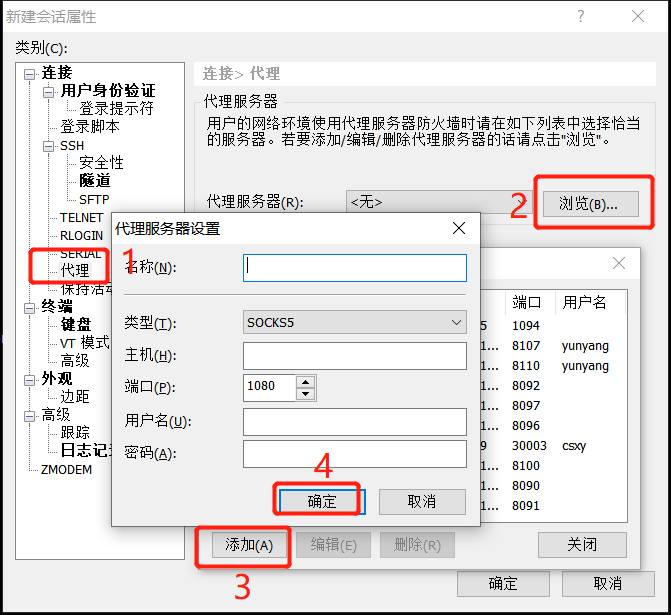
socks5代理客户端有很多种,比如xshell中就自带socks5代理配置。

-
浏览器socks5代理:
chrome代理:SwitchyOmega插件
-
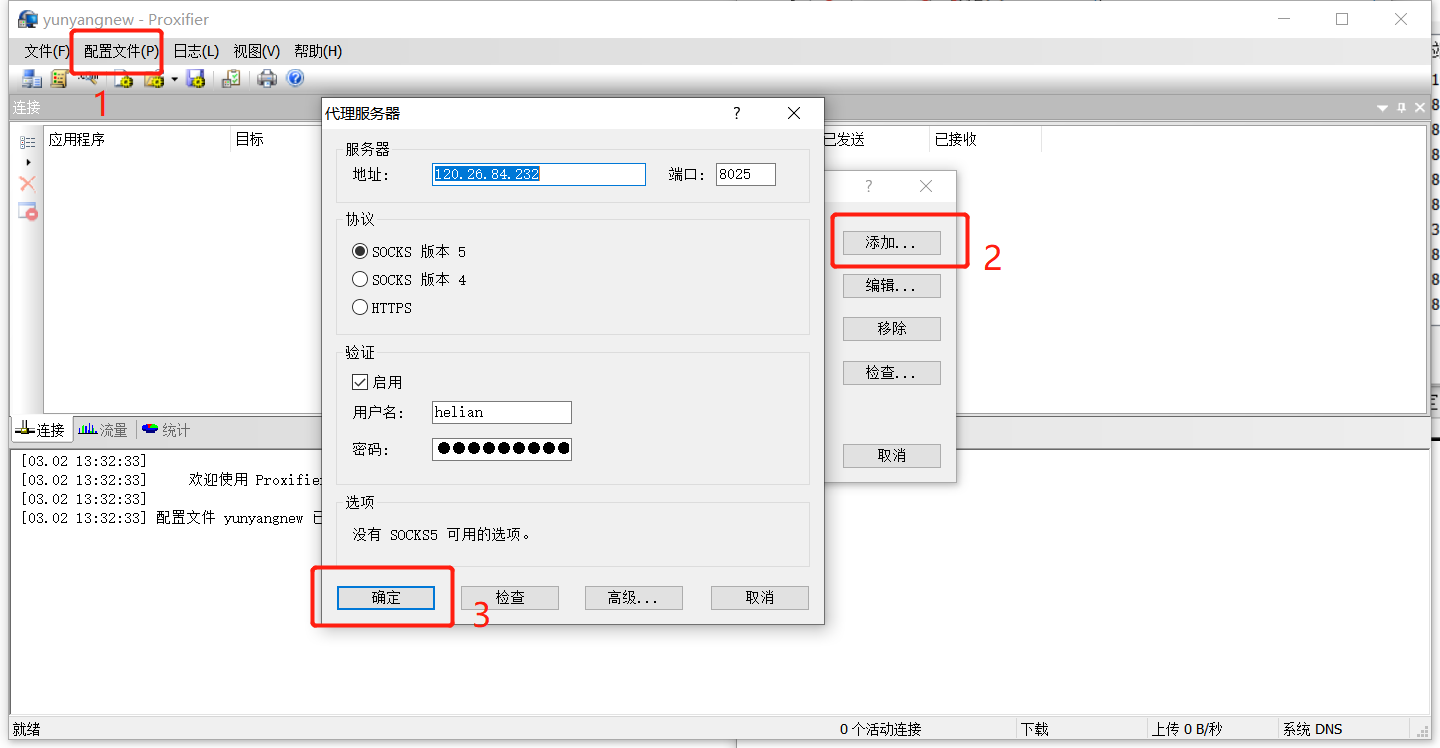
全局智能代理:proxifier
 CloudNativeQingFeng