K8s部署rocketmq Operator
环境
| 组件 |
版本 |
备注 |
| kubernetes |
1.20.11 |
阿里云ACK |
| rocketmq-operator |
0.3.0 |
apache官方 |
| rocketmq |
V4_5_0 |
apache官方 |
初始化环境
-
namespace
1
|
kubectl create ns rocketmq
|
-
console web SSL
1
|
kubectl create secret tls example --cert=7179959__example.com.pem --key=7179959__example.com.key -n rocketmq
|
-
官方包
1
|
git clone https://github.com/apache/rocketmq-operator.git
|
部署operator
默认配置中namespace是default,需要修改配置文件
 1
 2
 3
 4
 5
 6
 7
 8
 9
10
11
12
13
14
15
16
17
18
19
20
21
22
23
24
25
26
27
28
29
30
31
32
33
34
|
apiVersion: apps/v1
kind: Deployment
metadata:
  name: rocketmq-operator
  namespace: rocketmq
spec:
  replicas: 1
  selector:
    matchLabels:
      name: rocketmq-operator
  template:
    metadata:
      labels:
        name: rocketmq-operator
    spec:
      serviceAccountName: rocketmq-operator
      containers:
        - name: rocketmq-operator
          # Replace this with the built image name
          image: apacherocketmq/rocketmq-operator:0.3.0-snapshot
          command:
          - rocketmq-operator
          imagePullPolicy: Always
          env:
            - name: WATCH_NAMESPACE
              valueFrom:
                fieldRef:
                  fieldPath: metadata.namespace
            - name: POD_NAME
              valueFrom:
                fieldRef:
                  fieldPath: metadata.name
            - name: OPERATOR_NAME
              value: "rocketmq-operator"
|
运行官方提供的安装脚本
查看状态:
1
2
3
|
[root@qingfeng rocketmq-operator]# kubectl get pod -n rocketmq
NAME                               READY   STATUS    RESTARTS   AGE
rocketmq-operator-867c4955-2dkhb   1/1     Running   0          1m
|
部署rocketmq
rocketmq分为三个部分,nameservice、broker和console
安装顺序也是如此
| 服务 |
类型 |
| nameservice |
statefulset |
| broker |
statefulset |
| console |
deployment |
在部署sts服务之前需要先确定存储方式,这里测试使用HostPath方式进行存储。
需要在宿主机准备目录,官方提供了创建目录的脚本rocketmq-operator/deploy/storage/hostpath/prepare-host-path.sh,在宿主机上运行该脚本即可。
注意:在那台节点运行的该脚本,就需要在yaml描述文件中将nodeSelector设置为该节点,否则运行失败,但是官方rocketmq-operator的所有crd并没有nodeSelector的配置,非常不友好,作者在这里使用描述文件部署之后,再手动edit sts,为他添加节点配置。重新调度即可。
同样,先修改namespace
 1
 2
 3
 4
 5
 6
 7
 8
 9
10
11
12
13
14
15
16
17
18
19
20
21
22
23
24
25
26
27
28
29
30
31
32
33
34
35
36
37
38
39
40
41
42
43
44
|
apiVersion: rocketmq.apache.org/v1alpha1
kind: NameService
metadata:
  name: name-service
  namespace: rocketmq
spec:
  # size is the the name service instance number of the name service cluster
  size: 1
  # nameServiceImage is the customized docker image repo of the RocketMQ name service
  nameServiceImage: apacherocketmq/rocketmq-nameserver:4.5.0-alpine-operator-0.3.0
  # imagePullPolicy is the image pull policy
  imagePullPolicy: Always
  # hostNetwork can be true or false
  hostNetwork: true
  #  Set DNS policy for the pod.
  #  Defaults to "ClusterFirst".
  #  Valid values are 'ClusterFirstWithHostNet', 'ClusterFirst', 'Default' or 'None'.
  #  DNS parameters given in DNSConfig will be merged with the policy selected with DNSPolicy.
  #  To have DNS options set along with hostNetwork, you have to specify DNS policy
  #  explicitly to 'ClusterFirstWithHostNet'.
  dnsPolicy: ClusterFirstWithHostNet
  # resources describes the compute resource requirements and limits
  resources:
    requests:
      memory: "512Mi"
      cpu: "250m"
    limits:
      memory: "1024Mi"
      cpu: "500m"
  # storageMode can be EmptyDir, HostPath, StorageClass
  storageMode: HostPath
  # hostPath is the local path to store data
  hostPath: /data/rocketmq/nameserver
  # volumeClaimTemplates defines the storageClass
  volumeClaimTemplates:
    - metadata:
        name: namesrv-storage
        annotations:
          volume.beta.kubernetes.io/storage-class: rocketmq-storage
      spec:
        accessModes: [ "ReadWriteOnce" ]
        resources:
          requests:
            storage: 1Gi
|
部署nameservice
1
|
kubectl apply -f example/rocketmq_v1alpha1_nameservice_cr.yaml
|
查看状态:
1
2
3
4
|
[root@qingfeng example]# kubectl get pod -n rocketmq -o wide
NAME                               READY   STATUS    RESTARTS   AGE
name-service-0                     1/1     Running   0          1m
rocketmq-operator-867c4955-2dkhb   1/1     Running   0          5m
|
部署service,描述文件rocketmq-operator/example/rocketmq_v1alpha1_cluster_service.yaml,需要修改部分内容,官方使用的NodePort,而我后面会用ingress做路由代理。所以修改了service端口类型。
 1
 2
 3
 4
 5
 6
 7
 8
 9
10
11
12
13
14
15
16
17
18
19
20
21
22
23
24
25
26
27
28
|
apiVersion: v1
kind: Service
metadata:
  name: console-service
  namespace: rocketmq
  labels:
    app: rocketmq-console
spec:
  type: ClusterIP
  selector:
    app: rocketmq-console
  ports:
    - port: 8080
      targetPort: 8080
      protocol: TCP
---
apiVersion: v1
kind: Service
metadata:
  name: name-server-service
  namespace: rocketmq
spec:
  type: ClusterIP
  selector:
    name_service_cr: name-service
  ports:
    - port: 9876
      targetPort: 9876
|
console是后面console服务的service,可以先部署。
broker也一样,修改namespace
 1
 2
 3
 4
 5
 6
 7
 8
 9
10
11
12
13
14
15
16
17
18
19
20
21
22
23
24
25
26
27
28
29
30
31
32
33
34
35
36
37
38
39
40
41
42
43
44
45
46
47
48
49
50
51
52
53
54
55
56
57
58
59
60
61
62
63
64
65
66
67
68
69
70
71
72
73
74
75
|
apiVersion: v1
kind: ConfigMap
metadata:
  name: broker-config
  namespace: rocketmq
data:
  BROKER_MEM: " -Xms2g -Xmx2g -Xmn1g "
  broker-common.conf: |
    # brokerClusterName, brokerName, brokerId are automatically generated by the operator and do not set it manually!!!
    deleteWhen=04
    fileReservedTime=48
    flushDiskType=ASYNC_FLUSH
    # set brokerRole to ASYNC_MASTER or SYNC_MASTER. DO NOT set to SLAVE because the replica instance will automatically be set!!!
    brokerRole=ASYNC_MASTER

---
apiVersion: rocketmq.apache.org/v1alpha1
kind: Broker
metadata:
  # name of broker cluster
  name: broker
  namespace: rocketmq
spec:
  # size is the number of the broker cluster, each broker cluster contains a master broker and [replicaPerGroup] replica brokers.
  size: 2
  # nameServers is the [ip:port] list of name service
  nameServers: "name-server-service:9876"
  # replicaPerGroup is the number of each broker cluster
  replicaPerGroup: 1
  # brokerImage is the customized docker image repo of the RocketMQ broker
  brokerImage: apacherocketmq/rocketmq-broker:4.5.0-alpine-operator-0.3.0
  # imagePullPolicy is the image pull policy
  imagePullPolicy: Always
  # resources describes the compute resource requirements and limits
  resources:
    requests:
      memory: "2048Mi"
      cpu: "250m"
    limits:
      memory: "12288Mi"
      cpu: "500m"
  # allowRestart defines whether allow pod restart
  allowRestart: true
  # storageMode can be EmptyDir, HostPath, StorageClass
  storageMode: HostPath
  # hostPath is the local path to store data
  hostPath: /data/rocketmq/broker
  # scalePodName is [Broker name]-[broker group number]-master-0
  scalePodName: broker-0-master-0
  # env defines custom env, e.g. BROKER_MEM
  env:
    - name: BROKER_MEM
      valueFrom:
        configMapKeyRef:
          name: broker-config
          key: BROKER_MEM
  # volumes defines the broker.conf
  volumes:
    - name: broker-config
      configMap:
        name: broker-config
        items:
          - key: broker-common.conf
            path: broker-common.conf
  # volumeClaimTemplates defines the storageClass
  volumeClaimTemplates:
    - metadata:
        name: broker-storage
        annotations:
          volume.beta.kubernetes.io/storage-class: rocketmq-storage
      spec:
        accessModes: [ "ReadWriteOnce" ]
        resources:
          requests:
            storage: 8Gi
|
这里除了修改了namespace和storageMode之外,还修改了nameServers,内容为nameservice的service名字,加上他的端口。通过kubedns进解析。
部署broker
1
|
kubectl apply -f example/rocketmq_v1alpha1_broker_cr.yaml
|
查看状态:
1
2
3
4
5
6
7
8
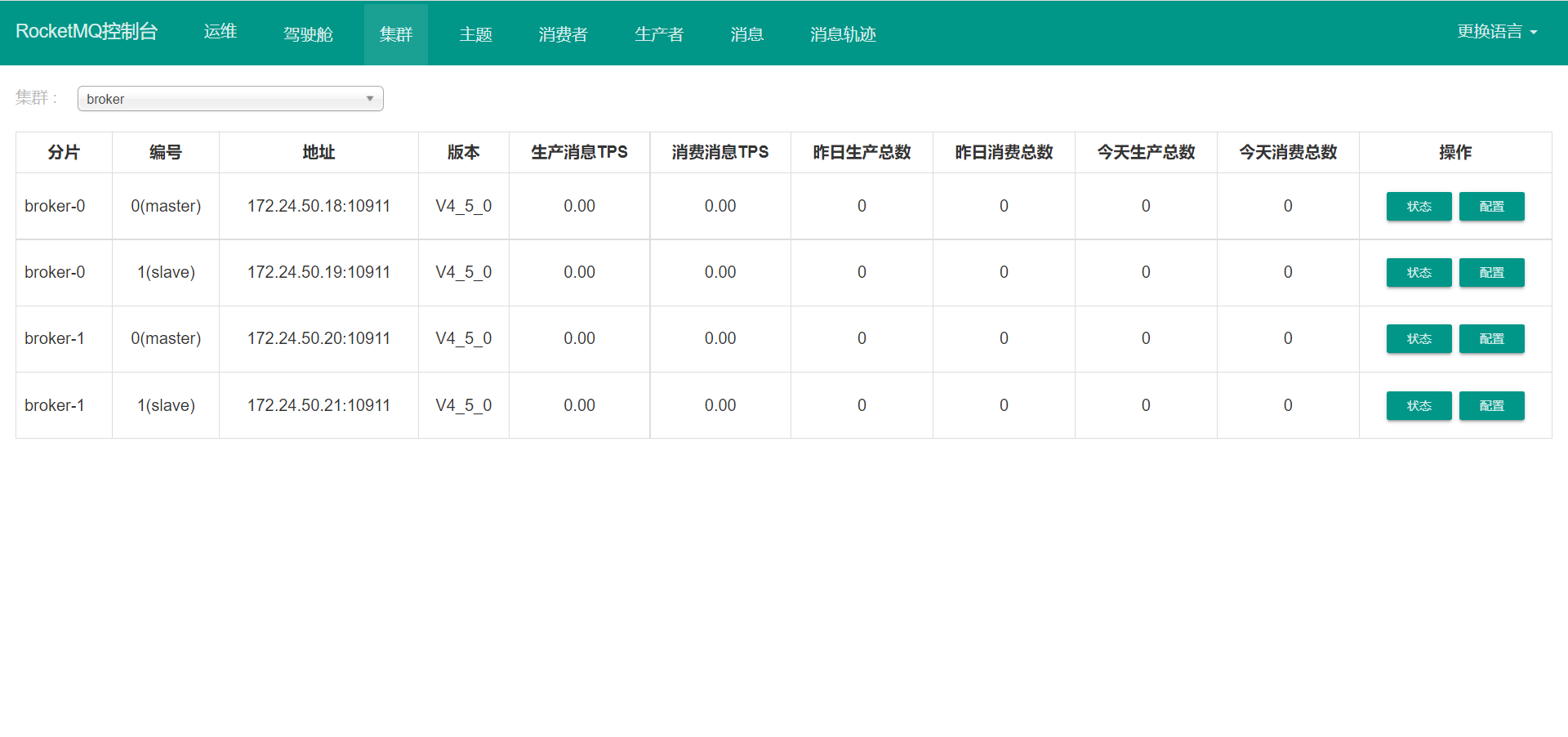
|
[root@qingfeng example]# kubectl get pod -n rocketmq
NAME                               READY   STATUS    RESTARTS   AGE
broker-0-master-0                  1/1     Running   0          1m
broker-0-replica-1-0               1/1     Running   0          1m
broker-1-master-0                  1/1     Running   0          1m
broker-1-replica-1-0               1/1     Running   0          1m
name-service-0                     1/1     Running   0          5m
rocketmq-operator-867c4955-2dkhb   1/1     Running   0          10m
|
console是web服务,也需要配置nameservice的连接方式。
 1
 2
 3
 4
 5
 6
 7
 8
 9
10
11
12
13
14
15
16
17
18
19
20
21
22
23
24
25
26
27
28
29
30
|
apiVersion: rocketmq.apache.org/v1alpha1
kind: Console
metadata:
  name: console
  namespace: rocketmq
spec:
  # nameServers is the [ip:port] list of name service
  nameServers: "name-server-service:9876"
  # consoleDeployment define the console deployment
  consoleDeployment:
    apiVersion: apps/v1
    kind: Deployment
    metadata:
      labels:
        app: rocketmq-console
    spec:
      replicas: 1
      selector:
        matchLabels:
          app: rocketmq-console
      template:
        metadata:
          labels:
            app: rocketmq-console
        spec:
          containers:
            - name: console
              image: apacherocketmq/rocketmq-console:2.0.0
              ports:
                - containerPort: 8080
|
部署console
1
|
kubectl apply -f rocketmq-operator/example/rocketmq_v1alpha1_console_cr.yaml
|
查看状态:
1
2
3
4
5
6
7
8
9
|
[root@qingfeng example]# kubectl get pod -n rocketmq
NAME                               READY   STATUS    RESTARTS   AGE
broker-0-master-0                  1/1     Running   0          11m
broker-0-replica-1-0               1/1     Running   0          11m
broker-1-master-0                  1/1     Running   0          11m
broker-1-replica-1-0               1/1     Running   0          11m
console-76bd6d6c49-x9mwv           1/1     Running   0          1m
name-service-0                     1/1     Running   0          16m
rocketmq-operator-867c4955-2dkhb   1/1     Running   0          21m
|
为console添加ingress路由,这个官方没有要看自己的环境需要如何访问,我这里使用的是ingress
 1
 2
 3
 4
 5
 6
 7
 8
 9
10
11
12
13
14
15
16
17
18
19
20
21
22
23
|
apiVersion: networking.k8s.io/v1
kind: Ingress
metadata:
  annotations:
    nginx.ingress.kubernetes.io/ssl-redirect: "false"
  name: console
  namespace: rocketmq
spec:
  rules:
  - host: h2brocket.example.com
    http:
      paths:
      - backend:
          service:
            name: console-service
            port:
              number: 8080
        path: /
        pathType: ImplementationSpecific
  tls:
  - hosts:
    - '*.example.com'
    secretName: example
|
测试访问

 CloudNativeQingFeng